Rin's Guide: How to Apply for an Uzbekistan Visa
What to prepare:
- Photo
- Passport biodata page
- Phone number
- Address in Thailand
- Workplace information
- Credit card for payment
Go to
https://e-visa.gov.uz/main
About the Electronic Visa (e-Visa)
When crossing border checkpoints and during their stay in the Republic of Uzbekistan, foreign citizens must present a valid travel document (passport).
along with an electronic visa (e-visa) in either printed or electronic format.
The e-visa is issued based on the information in the travel document used for identification, and it is valid only when presented together with that same document.
If the information on the e-visa does not match the information in your passport, the visa will be considered void.
Foreign nationals are responsible for the accuracy of all information provided in their e-visa application.
Application processing is subject to a consular fee of 20 USD, payable through the online international payment system on the website.
The applicant does not need to be the owner of the card used for payment. This consular fee covers processing only and is non-refundable under any circumstances.
Foreign nationals may be denied a visa in accordance with the laws of the Republic of Uzbekistan. In such cases, a notification of refusal will be sent to the applicant's email address.
For the e-visa application, foreign nationals holding dual or multiple citizenships
must select the travel document of the country that you plan to use to enter the territory of the Republic of Uzbekistan
The result of the application review will be sent to the applicant's email address
About the Web-portal
The official website for applying for an e-visa to the Republic of Uzbekistan is www.e-viza.gov.uz
The website supports 3 languages: English, Uzbek and Russian
The visa application process through the website consists of 2 steps
namely submitting the application and waiting for the responseresult
The steps for completing the e-visa application are as follows:
Country section: Select your citizenship, travel document type, and purpose of visit.
Dates section: Select the duration of your stay in the Republic of Uzbekistan.
Personal data section: Fill in your personal details according to your profile.
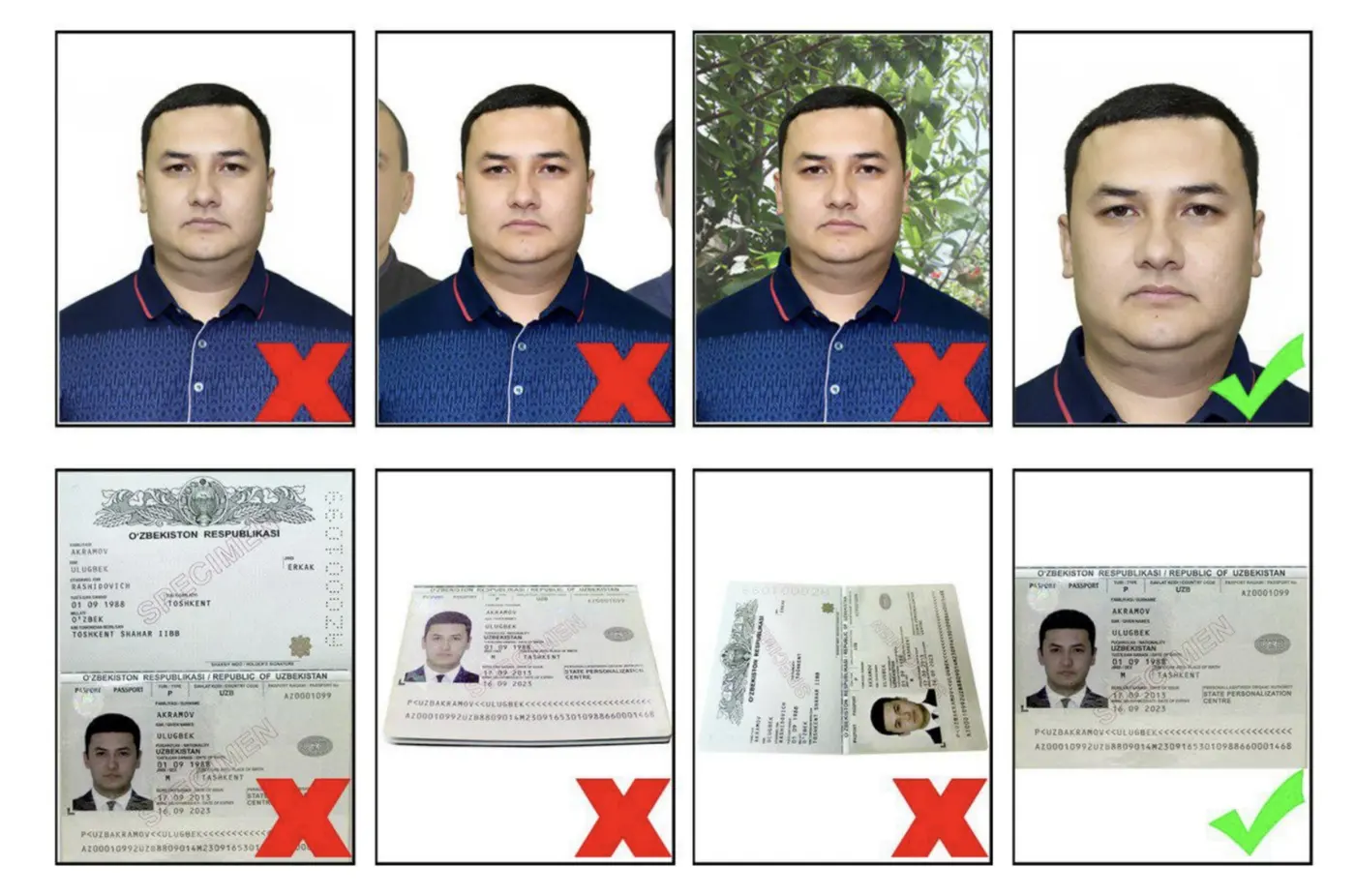
Photo and passport section: Upload a facial photo and a copy of your passport bio page (the page with primary information).
Activation section: Enter your email address.
Payment section: Pay the consular fee via the international payment system using a Visa card.
If a foreign national is eligible for visa-free entry to Uzbekistan under international agreements,
the system will halt the procedure before the payment step and inform the user that a visa is not required.
If the foreign national's country is not included in the list of eligible countries for the simplified procedure,
the system will inform the user that they must contact the embassy or foreign missions of the Ministry of Foreign Affairs of Uzbekistan directly.
Personal details must be entered in English only, exactly matching the travel document (passport) that will be used to enter Uzbekistan.
Facial photos must comply with the International Civil Aviation Organization (ICAO) DOC9303 standards.
The passport photo (bio page) must be clearly legible (file size must not exceed 500 KB).
Application activation is complete once the applicant enters the digital verification code received by email.
The consular fee must be paid with a Visa card. Once payment is complete, a confirmation email will be sent notifying the applicant that their application has been successfully submitted for processing.
The website features a system to track the status of your application.
Once approved, the e-visa will be sent to the applicant's email address as a PDF file.
If the visa is refused, the system will send an email notification advising the applicant to apply through the embassy or foreign missions of the Ministry of Foreign Affairs of Uzbekistan instead.
If you encounter technical issues, you can contact the hotline at (+998 71) 200-00-88 or use the support function on the website ([email protected]).
Planning it yourself?
What independent travellers usually book before they go, from providers that actually work

Thai language, pay in baht
 Photo: 26D · CC BY-SA 4.0 · Wikimedia Commons
Compare many rental companies on one page

Popular with Thai travellers, Thai-language pages

Museum and landmark tickets, ready on your phone
 Photo: Guidecity · CC BY-SA 4.0 · Wikimedia Commons
Hotels near the station and old town, many with free cancellation

One way from about 6,248 baht (Oct 2027)
Partner links · we may earn a small commission when you book, your price stays the same
Let Rin design a trip for your group